

Here is an important message from Frank. Please read it all.
—
Thanks so much for joining my exclusive UNFILTERED email list!
Some of you know me personally, but I’ve yet to meet many of you in person. So my updates are designed to do two things:
1. Encourage and challenge you with my newest and best writings in a personal way.
2. Update you on FREE resources and discounted bonuses.
I will send you my UNFILTERED articles every Thursday.
Each article is very short, but they pack an uncommon punch.
FIRST THINGS FIRST: REMOVE ME FROM YOUR PROMOTIONS TAB
If you use Gmail, you need to make sure my emails don’t go into your Promotions tab. But instead, that they go into your Primary inbox.
If you use a computer, look at the top right of your inbox.
If you use a phone, look for the 3-line menu icon on the top left and click it.
If you see my email in the Promotions folder, drag the email into your Primary tab inbox (to the far left).

Click “Yes” in the yellow box to have all my emails moved automatically to your Primary inbox.

This is how you ensure my emails don’t go into your “Promotions” folder – which you will probably never see.
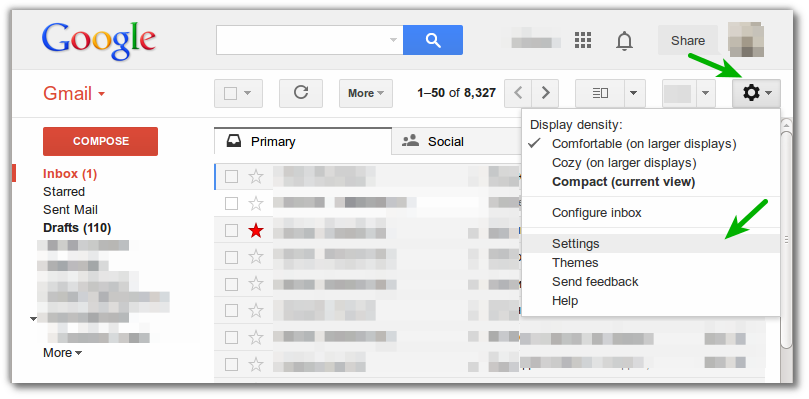
1. Go to “Settings” on the right top corner.
2. Click “Configure Inbox.”
3. Then uncheck every folder except for “Primary.”
Problem solved. See image below.
FINALLY: Be sure to add Frank@Frankviola.com to your address book/contact list. This will help prevent my updates from going into your Spam or Junk folder.
Unfortunately, many people miss my time-sensitive free offers because the emails go into their Spam and Junk folder — or Promotions tab — and they don’t check those regularly. So don’t let that happen to you!
Talk to you on Thursday!
P.S. Check out my signature book on the Kingdom of God – just click the banner below.