

You’ve successfully joined the SCRIBE wait list.
To prevent yourself from missing the email notification when it’s available again, read this carefully.
Remember, the SCRIBE training is ALL online.
You don’t have to leave your house to take it. And once you get it, you have it for LIFE and can take it at your own PACE, so time and being busy is never an issue.
When it reopens, you will want to get it and not wait another year, since it’s only available once a year.
REMOVE OUR EMAIL FROM YOUR PROMOTIONS TAB
If you use Gmail, you need to make sure our emails don’t go into your Promotions tab. But instead, that they go into your Primary inbox.
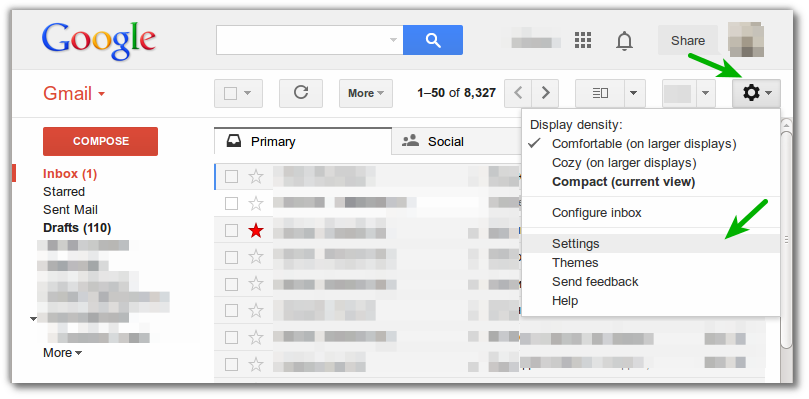
If you use a computer, look at the top right of your inbox.
If you use a phone, look for the 3-line menu icon on the top left and click it.
If you see our email in the Promotions folder, drag the email into your Primary tab inbox (to the far left).

Click “Yes” in the yellow box to have all my emails moved automatically to your Primary inbox.

This is how you ensure our emails don’t go into your “Promotions” folder – which you will probably never see.
1. Go to “Settings” on the right top corner.
2. Click “Configure Inbox.”
3. Then uncheck every folder except for “Primary.”
Problem solved. See image below.
If you use Hotmail, check the OTHER folder for our emails. It’s the tab to the right of your FOCUSED folder in your inbox, top menu above the emails. See image below.

FINALLY: Be sure to add FrankViolaAuthor@gmail.com to your address book/contact list.