

Thanks for joining the MinistryMind Waiting List.
IMPORTANT: REMOVE ME FROM YOUR PROMOTIONS TAB
If you use Gmail, you need to make sure my emails about the Event don’t go into your Promotions tab. But instead, that they go into your Primary inbox.
(This is what the Promotions tab looks like. Look at the top right of the inbox.)
On a smart phone, click the Menu icon (3 lines on the left).

This is how you ensure my emails don’t go into your “Promotions” folder – which you will probably never see.
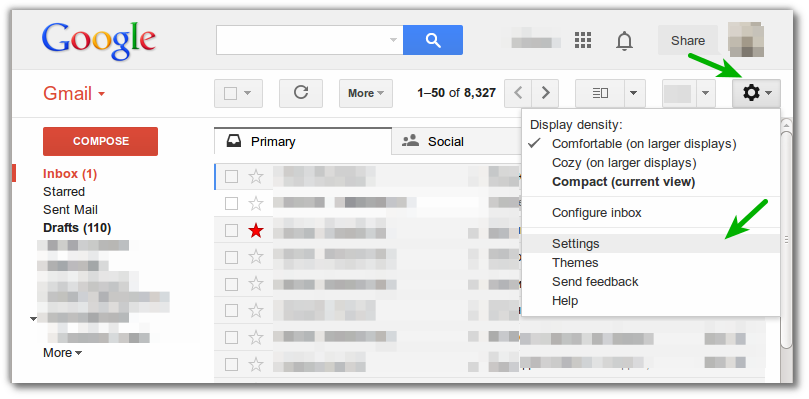
1. Go to “Settings” on the right top corner.
2. Click “Configure Inbox.”
3. Then uncheck every folder except for “Primary.”
Problem solved. See image below.
FINALLY: Be sure to add frank@frankviola.com to your address book/contact list. This will help prevent my notifications about MinistryMind from going into your Spam or Junk folder.